


Telegram was launched in 2013 as a messaging app, but over time, it has become more than a messenger. Now, people use it to follow news, niche topics, and industry updates, and to join communities. The main difference from traditional social media like Instagram and TikTok is that Telegram doesn’t rely on algorithms. It’s chronological — users see messages and posts in the exact order they’re published.
Most importantly, over more than ten years of development, the app has added many features for business use, as well. Content creators can use Telegram for business in different ways, for example, to offer subscription-based access to private channels with exclusive content. Businesses can also use it to sell digital and physical products, share updates, and provide customer support.
Discover different ways you can use the app to grow your business and how to set up your Telegram business account. Learn how to grow your channel, what bots you can use for automation, and much more.
Quick Facts: Telegram at a Glance
Here are some quick facts about the platform:
- Over 1 billion monthly active users worldwide (2026)
- Around 500 million daily active users
- Approximately 2.5 million new users join every day
- Channels can host unlimited subscribers
- Groups support up to 200,000 members
- No content algorithm: posts reach subscribers in chronological order
- Average channel post reach: 18% (compared to 6% on Instagram)
- File sharing up to 2 GB per file with no compression
- Native in-app payments: Telegram Stars, Toncoin, and third-party services like Tribute
What’s New in Telegram for Business in 2026
Telegram has shipped several business-relevant features over the past year that change how creators and businesses operate on the platform:
- Over 1 billion monthly active users worldwide (2026)
- Telegram Stars: an in-app currency users can buy and send to channels, bots, or creators. Stars can be converted to Toncoin or withdrawn via Fragment, opening a native path to creator payouts.
- Toncoin payments: businesses can accept TON cryptocurrency directly in chats or via bots, with no intermediary processor required.
- Suggested Posts: channel owners can monetize their audience by accepting paid sponsored content from advertisers, with a transparent approval flow.
- Mini Apps: full web applications running inside Telegram. Over 500 million people now use Mini Apps for shopping, booking, gaming, and financial services.
- AI summaries and checklists: built-in productivity features that help businesses manage long chats and collaborative work.
- Affiliate programs: native commission-based partnerships for creators and businesses promoting third-party products.
For businesses focused on recurring revenue and subscription content, third-party Telegram-verified services like Tribute remain the most flexible option, since native Stars-based subscriptions and crypto payouts still have currency and payout limitations in some regions.
Can Telegram Be Used for Business?
Yes, you should definitely consider using Telegram for business, and here’s why:
- On platforms like Instagram or X, algorithms decide which posts appear in users’ feeds, so some followers may never see your updates. Telegram sends posts directly to subscribers in chronological order, so your updates are more likely to reach your audience.
- Channels can have unlimited subscribers, so your audience can grow as much as you want.
- For user convenience, businesses can sell digital and physical products and provide customer support directly through the app.
- The platform offers a Telegram Bot API, which lets you connect bots and automate Telegram business account, channel, and group management.
- While you can develop your own bot, the app’s community is big, and multiple ready-made solutions already exist to address numerous Telegram business needs.
Telegram Business Account vs. Telegram Channel vs. Telegram Group
Depending on whether you want to handle customer inquiries, broadcast updates, or grow a community where people can communicate with each other, you can choose from three main tools: Telegram business account, channel, and group:
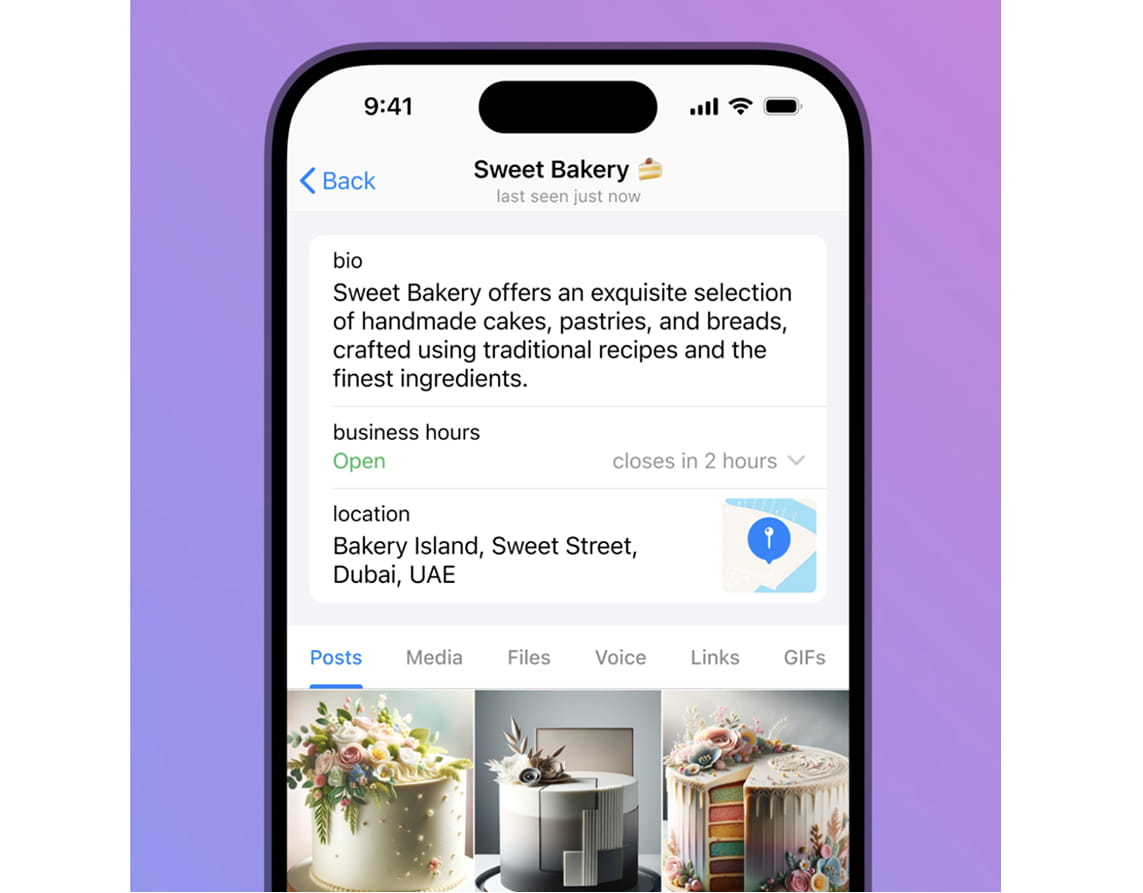
- A business account is where customers can contact you directly to ask questions, request information, or get support. You can add details such as your business description and working hours to enhance the user experience.
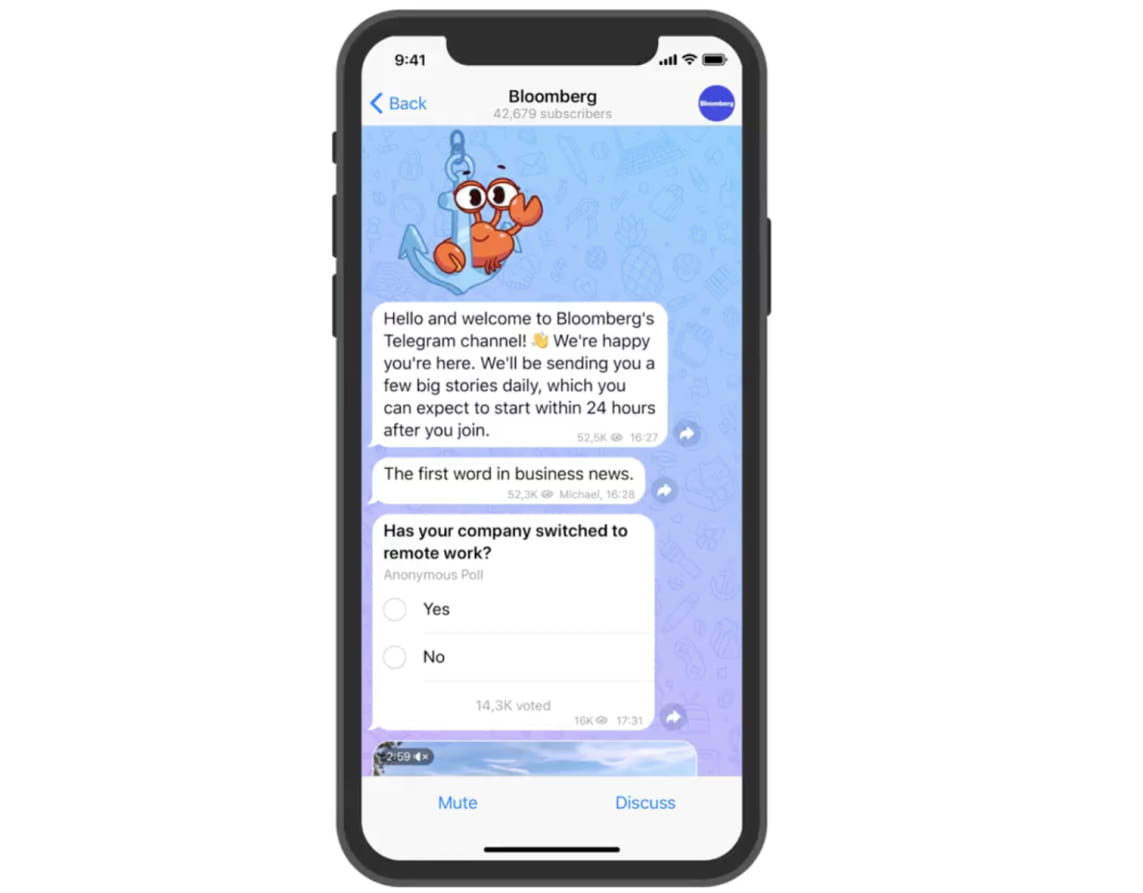
- A channel is used to send updates to an audience. Subscribers receive your posts, but they usually can’t reply in the channel itself. Channels are ideal for promotions and sharing useful content.
- A group is designed for conversation. Everyone can participate and interact with each other.
Here is a comparison of Telegram business accounts, channels, and groups:
How to Create a Telegram Business Account
It doesn’t take much to start using Telegram for business. You don’t need to register a new account or install another app — just turn on business features inside your existing profile. Here’s how you can create your Telegram business account:
- Go to Settings
- Scroll down and select Telegram Business
- Upgrade to Premium. Currently, Telegram Business features are bundled with a Telegram Premium subscription. If you aren’t a Premium member yet, you will be prompted to subscribe.
- Once you subscribe, the Telegram Business menu will unlock, allowing you to begin customizing your business profile.
- Define your business hours to let customers know when you are “Open” or “Closed.”
- Link your physical office or store address so it appears on a map within your Telegram business account.
- Design the “blank” chat screen that new customers see before they send their first message. You can add a greeting and a specific sticker to set the tone of the conversation.
Now, customers can contact you directly via your Telegram business account. This makes communication faster and easier than traditional methods like phone calls or email.
How to Create a Telegram Channel for Business
Here’s how to create a new channel:
- Open the app and tap the New Message icon.
- Select Create Channel.
- Pick a name for your channel.
- Write a brief description explaining what people will get if they subscribe.
- Upload a channel picture. You can add your logo or another recognizable image.
- Choose whether your channel is public or private. Public channels can be found in search and have a link you can share, while private channels are accessible only through an invitation link.
- Invite your first subscribers.
Group creation follows a similar process. You can also choose whether others are allowed to copy and forward your content in case you want an extra layer of protection for your Telegram business, especially if people pay for access to your content.
Telegram Bots for Business
When using Telegram for business, people often rely on bots to simplify customer communication and make it more convenient for both sides. The bot can greet and offer a menu of options where people can choose the reason for their inquiry. It can also provide basic information or redirect user requests to the appropriate customer support specialist.
There are many more ways to use bots in your Telegram for business account. Plus, you usually don’t need to create custom bots from scratch. There are many ready-made solutions built for different Telegram business purposes. For instance, Tribute, a Telegram-verified service, lets you receive payments for subscriptions and donations right in the app, without redirecting users to third-party platforms. You can get paid in EUR or USD. You can also receive crypto (USDT or BTC) payments, which are supported by Tribute’s direct integration with Telegram Walt.
Overall, you can use bots to automate the following Telegram business activities:
- Granting users access to exclusive content
- Monetization
- Notifications
- Marketing
- Appointment booking
- Surveys and feedback collection
- Customer support
Using Telegram for Customer Support
Businesses often use Telegram as a customer support channel alongside contact forms and email. And customers often prefer to contact support via this app, too. They can just send a message to your Telegram business account and get a reply — no forms, no waiting lines.
As your Telegram business grows, bots can assist your customer support team with numerous routine tasks:
- Sending automated messages
- Answering FAQs
- Sharing pricing or product details
- Providing instructions
- Directing customers to a human manager when needed
Using Telegram for Marketing and Growth
People also use Telegram for business to promote their brands. As it works differently from other social media platforms, you don’t have to compete with algorithms, and your updates go straight to your audience.
Channels are especially useful for broadcasting updates. You can share announcements or practical tips, and your messages will be delivered to all your subscribers simultaneously.
Here are the main ways you can grow your business via the app:
- Send announcements about discounts, special deals, and new offers
- Share useful information related to your products, services, or industry
- Publish customer reviews or success stories to build trust
- Create several channels to target different products, languages, or customer groups
- Collaborate with other channels to reach new audiences
Monetizing Telegram: Subscription Models Explained
You can use Telegram for business to create a private channel and share paid, exclusive content with subscribers. This can be educational materials, expert advice, or market insights. This will also allow you to easily build a private, paid, and exclusive community.
Several monetization models exist to earn a stable income from your Telegram business. The most popular one is a monthly subscription. Subscribers can access your private channel as long as they continue paying. Another option is tiered memberships, where subscribers can choose from several plans with different prices and benefits, including additional content or closer interaction with you.
In addition, some businesses prefer one-time payments. Customers pay once and get permanent access to the channel or group.
Managing Paid Telegram Communities at Scale
If you only have a small private channel with 10 or 20 members, you can probably manage it manually. But when you have hundreds or thousands of subscribers, managing your Telegram business can turn into a full-time job. This is precisely where you can take advantage of Telegram-verified platforms like Tribute. Here’s how they can help you manage large communities:
- Grant access automatically when users pay for the subscription
- Revoke access when users stop paying
- Moderate groups by filtering spam or inappropriate content and links
Security, Compliance, and Data Protection
One more reason to choose Telegram for business is its strong focus on security and privacy. The platform protects messages using end-to-end encryption, which means your messages are turned into coded data while they are being sent, making it much harder for others to intercept your conversations.
The app also has numerous privacy settings. For example, customers can contact you without seeing your phone number, and you can control who can message you or invite you to groups. You can also restrict screenshots and prevent content from being saved to a device. This can help you keep your material exclusive while reducing the risk of copyright infringement.
It’s worth mentioning, though, that Telegram is a cloud-based service, which means your chats and files can be automatically synced across multiple devices. While this is convenient if you use it on your phone, PC, and tablet, someone else may be able to view your Telegram business messages and customer data on their own device if they gain access to your account.
Therefore, when using Telegram for business, it’s important not to share your login credentials with anyone. It’s also a good idea to enable two-factor verification to protect your profile and sensitive customer information. Plus, the platform lets you check every active session. If you notice a device you don’t recognize, it’s best to close this session immediately.
Telegram API for Automation
Telegram offers two developer-facing APIs — the straightforward Bot API for building bots and automations, and the more powerful MTProto API that unlocks the full range of functionality available in the official app. Together, they’re a big part of why Telegram has such a rich bot ecosystem, with tools that cover a wide range of Telegram business needs, from community management to monetization services like Tribute.
The API also allows the Telegram app to be connected to CRM systems. Thus, its messages can appear inside your CRM alongside customer requests from email, live chats, and website contact forms.
Overall, you can consider multiple integrations when using Telegram for business:
- CRMs
- Websites
- Customer support systems
- Monitoring tools
- Analytics platforms
- Project management tools, etc.
How to Grow to 1,000+ Members on Telegram
To earn from Telegram business, whether you want to promote your brand, monetize your channel, or both, you first need to attract enough subscribers. Here are some tips that can help you reach your first thousand subscribers:
- Share your channel across your existing platforms: Promote it on your website, other social media profiles, and in newsletters. People who already know about you are more likely to subscribe.
- Offer value: Give people a reason to join your channel — useful information, exclusive offers, and anything else not available elsewhere can be shared on your Telegram.
- Advertise: Promote your channel through Telegram Ads or by buying posts in other channels with a similar audience.
- Use referral and invite links: Encourage your subscribers or partners to invite others using special links. This works especially well if you offer small rewards for referrals.
- Write clear and interesting post titles: People often scroll through a channel before deciding whether to subscribe. If your posts don’t catch their attention, they may leave.
- Give people a reason to stay subscribed: Post something useful or interesting regularly so subscribers don’t lose interest.
Why Tribute Is Built for Monetized Telegram Communities
If you’re ready to use Telegram for business, you’ll eventually need to automate workflows, and payment management is one of them. Tribute is a Telegram-verified service that lets you manage recurring subscriptions and one-time donations directly within the app, so your subscribers never have to go anywhere else to support you.
Beyond subscriptions, Tribute also enables creators to sell digital products as a core monetization feature. You can offer photos, videos, tutorials, courses, e-books, and other downloadable content directly within Telegram, without redirecting users to external platforms, keeping the entire purchase experience seamless and native to the app.
Why choose Tribute for your Telegram business:
- Telegram-verified bot.
- Telegram-like interface that feels familiar and easy to use.
- Easy setup — connect the bot, create a subscription, provide your payment details, and start accepting payments
- Global payments — accept EUR, USD, or crypto (USDT) from customers in over 190 countries worldwide.
- Built-in affiliate program — invite partners and scale your sales with ease.
- No technical knowledge is required to install and start using the bot.
- Easy-to-understand dashboard.
Whether you’re an influencer, streamer, or business owner, Tribute will help you automate your Telegram business monetization and manage subscriptions with minimal effort.
Final Thoughts: Is Telegram Right for Your Business?
If you consider using Telegram for business, sharing content that people pay to access, or selling products and services, this is indeed a powerful platform that can let you achieve your goals. Here, you can manage private channels for publishing paid content, create a Telegram business account to serve your customers, use bots to provide customer support, and much more.
Content creators, educators, and service providers all choose Telegram for business, thanks to the variety of monetization opportunities. It’s also a good fit for digital product sellers and businesses with an international audience.
Most importantly, Telegram business monetization can be easily automated with the right solution in place. Tribute makes it much easier to turn this app into a source of income by automating payments. Put your subscription management on autopilot with Tribute!
FAQ
Can Telegram be used for business?
Yes. Telegram supports businesses through three main tools: a business account for direct customer communication, channels for broadcasting updates to unlimited subscribers, and groups for community discussion. Businesses can also accept payments, run bots, and sell digital products natively inside the app.
What is Telegram Business?
Telegram Business is a set of features bundled with the Telegram Premium subscription. It lets you turn a personal Telegram account into a business profile with custom business hours, a physical address on the map, automated greetings, quick replies, and chatbot integration, all without creating a separate account.
Is Telegram Business free?
No. Telegram Business features are bundled with Telegram Premium, which is a paid monthly subscription. However, the core platform itself, including channels, groups, and the Bot API, remains free to use for business purposes.
How much does a Telegram Business account cost?
Telegram Business is included in the Telegram Premium subscription. Pricing varies by region and is roughly equivalent to $5 USD per month at the standard rate. Some local markets show lower prices, and annual subscriptions reduce the per-month cost.
What is the difference between Telegram Premium and Telegram Business?
Telegram Premium is a subscription that unlocks advanced features for any user, including larger uploads, faster downloads, and exclusive stickers. Telegram Business is a feature set inside Premium, designed specifically for business owners: business hours, location, away messages, greeting messages, and quick replies.
How do I create a Telegram business account?
Open Telegram, go to Settings, scroll down and tap Telegram Business, then subscribe to Telegram Premium. Once active, the Telegram Business menu unlocks, and you can configure your business hours, location, greeting messages, and chatbot. Your existing personal account is used, with no separate signup.
Does Telegram have a business API?
Yes. Telegram offers two developer APIs. The Bot API is straightforward and used for building chatbots and automations. The MTProto API is more powerful and unlocks the full functionality available in the official client, including building custom clients and advanced integrations.
How do businesses make money on Telegram?
The most common revenue models on Telegram are paid channel subscriptions, one-time digital product sales, donations, sponsored posts, and affiliate commissions. Native payments are available through Telegram Stars and Toncoin, while third-party services like Tribute add support for fiat currencies (EUR, USD), recurring billing, and bank payouts.
Is Telegram better than WhatsApp for business?
Telegram and WhatsApp Business serve different needs. WhatsApp Business is stronger for direct messaging with verified business profiles and product catalogs. Telegram is stronger for broadcasting to large audiences through channels, building paid communities, automating with bots, and selling digital content. Many businesses use both.
How do I set up business hours on Telegram?
Open Telegram, go to Settings, then Telegram Business, and select Business Hours. You can specify your time zone and the days and times you are open. Customers contacting your business account will see an “Open” or “Closed” status, which sets expectations for response times.