In 2026, Discord’s new age-assurance rollout has pushed some gaming communities to reconsider how much they want to depend on one platform. Discord says most users will not need to verify their age manually, but age-group restrictions now affect access to some content, servers, and settings.
For some communities, that has made Telegram a more serious alternative. It works differently from Discord: Discord is stronger for voice chat, streaming, and real-time interaction, while Telegram is better suited to broadcasting content, growing an audience, and monetization.
This guide compares Telegram vs Discord for gaming across voice, streaming, community features, privacy, growth, and monetization, then looks at other Discord alternatives worth considering.
Telegram vs Discord for gaming communities: the short answer
Pick Discord if your community lives in voice channels during matches.
Pick Telegram if it lives on announcements, drops, and a paid inner circle.
| What your community mostly does | Better pick | Why |
| Talks in voice while playing | Discord | Always-on voice channels with low latency |
| Runs scrims, tournaments, and role-based access | Discord | Roles, permissions, and many text channels per server |
| Pushes patch notes, leaks, and deals to 10,000+ people | Telegram | Channels have no subscriber cap and notify phones directly |
| Hangs out mostly on mobile | Telegram | Lighter app and 2 GB file uploads on the free plan |
| Pays for a VIP community outside the US | Telegram | Discord’s built-in paid memberships require US banking |
| Buys guides, coaching, or merch from you | Telegram | Payment bots handle checkout and delivery inside the chat |
| Needs private group text | Neither | Neither encrypts group text end to end |
In most Discord vs Telegram debates, the honest answer for creators is a split. The free hangout stays where the voice is good, and the paid layer goes where the audience and the payouts are.
Why gamers are searching for Discord alternatives in 2026
Three things pushed gamers to look around: Discord’s age checks, a leak of ID photos at one of its support vendors, and a practical limitation around monetization.
Age assurance
Starting September 22, 2026, Discord sorts accounts into Adult, Teen, and Unconfirmed groups using account signals like account age, connected games, and server activity.
Discord says more than 90% of users won’t be asked to verify manually. Unconfirmed accounts keep messaging and voice, but lose some age-restricted content and settings until they confirm.
The ID leak
In October 2025, a breach at 5CA, a third-party support vendor, exposed ID photos from roughly 70,000 users who had submitted them during age appeals. That history is why any ID check lands badly with gamers.
Monetization is limited outside the US
Discord’s native paid memberships require US banking details, which makes them unavailable to many gaming creators and community owners outside the US. That becomes a bigger problem if you want to sell paid access or build recurring revenue from an international audience.
Telegram vs Discord: feature-by-feature comparison
Discord wins on voice, screen sharing, and server structure. Telegram wins on audience size, file sharing, broadcast reach, and built-in payments.
| Feature | Discord | Telegram |
| Monthly active users | About 200 to 260 million (third-party estimates) | 1 billion+ |
| Max community size | Large servers, organized by channels | Groups up to 200,000 members; channels unlimited |
| Structure | Servers, text and voice channels, roles | Groups with Forum Topics, plus broadcast channels |
| Voice | Persistent drop-in voice channels | Scheduled voice and video chats |
| Screen sharing | 720p at 30 fps free; higher with Nitro or boosts | In video chats, up to 30 people broadcasting |
| Live streaming | Go Live to people in a voice channel | Live streams in channels with no viewer cap, OBS supported |
| File uploads (free) | Small caps on the free plan | 2 GB per file (4 GB with Premium) |
| In-app games | Activities in voice channels | Mini Apps that run inside Telegram |
| Native paid memberships | US-based creators only | Stars, plus payment bots for subscriptions |
| Price | Free; Nitro optional | Free; Premium optional |
Let’s review some of the features in more detail.
Voice chat and screen sharing
Discord’s always-on voice channels are still the best option for in-game comms. Telegram voice chats work well for scheduled sessions, not drop-in squad talk.
On Discord, you hop into a voice channel mid-match and leave when you’re done. Go Live screen sharing runs at 720p and 30 fps on the free plan, and 1080p at 60 fps needs Nitro or a boosted server.
Telegram video chats let up to 30 people broadcast their camera or screen, with up to 1,000 watching. That works for a coaching session or a watch party. It feels less natural for five people calling rotations in a ranked match.
If you’re comparing voice chat alternatives to Discord for squad play, Telegram isn’t the strongest candidate.
Among Discord alternatives with screen share and low latency, TeamSpeak is the closer match (see the table further down).
Streaming and live events
Discord is easier for streaming to a small group of friends. Telegram is better for streaming to a large audience.
Telegram live streams in channels have no viewer cap. You can broadcast from OBS by starting a live stream in your channel, tapping “Start With,” and pasting the server details into OBS. Viewers can chat and raise a hand to join.
For creators looking at Discord alternatives for streaming, that’s the feature that matters. Your stream lands in the same channel where your audience already gets notifications, with no separate platform to send them to.
Community structure and moderation
Discord’s roles and channels scale to complex communities. Telegram’s Forum Topics give you channel-like threads inside one group, with fewer permission layers.
Discord lets you build a role for every layer: mods, clan members, subscribers, tournament teams. AutoMod and bots like MEE6 or Carl-bot handle filtering and warnings.
Telegram Topics split one group into threads such as LFG, builds, clips, and off-topic. Admins get granular rights, but regular members don’t get a role hierarchy. Bots fill most of the gaps.
If your community runs on complex rules and many sub-teams, Discord’s structure is hard to beat.
Reach and discovery
Telegram channels have no subscriber cap and push every post as a phone notification. That’s why patch-note, deal-alert, and esports-news channels live there.
Telegram also runs Mini Apps: games and tools that open inside the chat with no install. The 2024 wave of tap-to-earn games was built on them, and gaming remains one of the biggest Mini App categories.
Discord’s reach mostly stays inside your server. Telegram’s reach travels, because channel posts get forwarded into other chats with a link back to you.
Telegram vs Discord privacy: which is safer for your community?
Neither is a fully private messenger. Discord now end-to-end encrypts voice and video calls by default but not text, and Telegram end-to-end encrypts only one-to-one Secret Chats.
| Discord | Telegram | |
| Server and group text | Stored on Discord’s servers, not end-to-end encrypted | Cloud chats encrypted in transit and on servers, not end-to-end encrypted |
| Private text | Not end-to-end encrypted | Secret Chats: one-to-one, end-to-end encrypted, mobile apps only |
| Voice and video calls | End-to-end encrypted by default since March 2026, except stage channels | One-to-one calls end-to-end encrypted |
| Identity | Email sign-up | Phone number required, but you can hide it behind a username |
For group text, both companies store messages on servers they control. If you run a community on either app, treat server chat as readable by the platform.
Three settings are worth turning on either way:
- Two-step verification. Stops someone with your password from taking over the account.
- Hidden phone number. On Telegram, share a @username instead of your number.
- Session review. Log out devices you don’t recognize from the active sessions list.
If end-to-end encrypted group text is non-negotiable, private Discord alternatives like Signal or Element fit better than either app.
Can you make money from a gaming community on Discord or Telegram?
Yes on both, but Discord’s built-in paid memberships only work if you can give Stripe US banking details and a US ID. Telegram creators can get paid from many more countries through Stars and payment bots like @Tribute.
Discord’s Server Subscriptions let you create up to three monthly tiers and gate channels behind them. Discord takes 10%, but that fee applies after payment processing and taxes, and purchases through the iOS or Android apps can add an app-store cut on top. Creators outside the US use external tools like Patreon, Whop, or LaunchPass: the member pays on another site, and a bot grants the Discord role.
Telegram works differently. Buyers can pay with Telegram Stars, Telegram’s in-app currency, and payment bots handle subscriptions, access, and payouts without the member leaving the chat.
| Discord Server Subscriptions | Telegram with a payment bot (Tribute) | |
| Who can sell | US-based creators with US banking and ID | Creators who pass verification; buyers from any country |
| Payment methods | Cards, PayPal, Apple Pay, Google Pay | Cards, Apple Pay, Google Pay, TON, BTC, USDT; Telegram Stars for digital products |
| Creator fee | 10%, plus processing and app-store fees | 10% flat, payment provider fees included |
| Pricing tiers | Up to 3 | Unlimited |
| Where the buyer pays | Inside Discord | Inside Telegram |
| What you can sell | Memberships and some one-time products | Subscriptions, donations, digital and physical products, paid chats |
That eligibility gap is the main reason a lot of gaming creators run the paid part of their community on Telegram, even when the free hangout stays on Discord.
How to monetize a Telegram gaming community with Tribute
Tribute (@Tribute) is a Telegram-verified bot that lets you sell subscriptions, collect donations, and sell digital products without sending your audience off Telegram. Checkout, delivery, access, and renewals all happen inside the chat.
Here’s what that looks like for a gaming channel.
A paid VIP channel or group
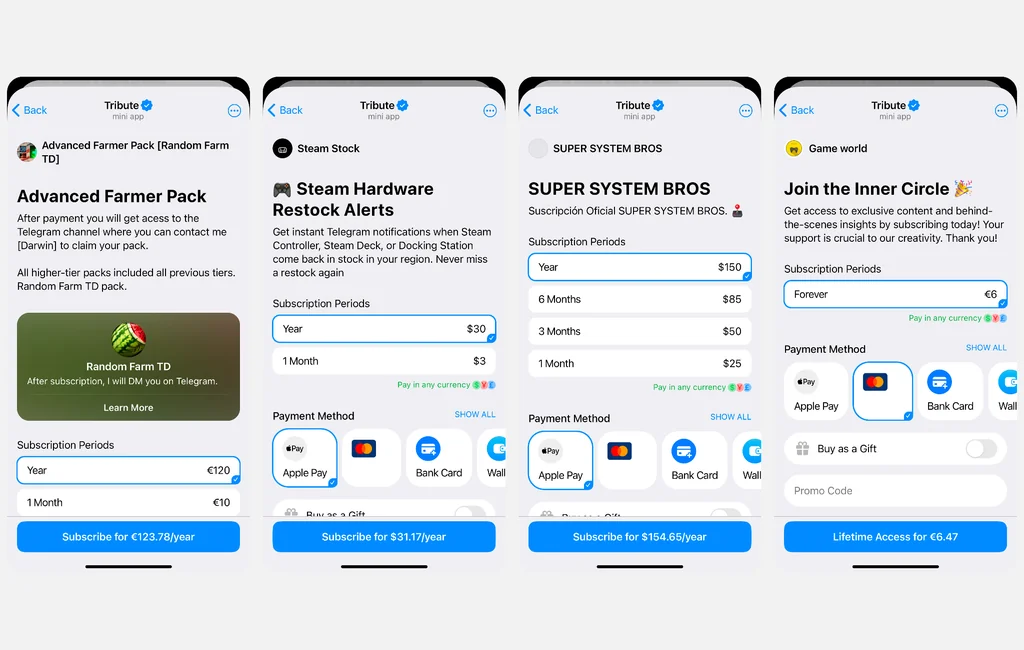
A private channel is the core product for most gaming creators. Think meta breakdowns after every patch, pro builds and tier lists, a scrim schedule, or early builds and a closed beta chat if you’re an indie developer.
The Tribute bot adds members when they pay and removes them if they don’t renew. The tools that shape your offer:
- Tiers on one channel: Run “Squad” and “Pro” levels side by side, billed weekly, monthly, every 3 or 6 months, yearly, or once.
- Free trials: Offer 1, 12, or 24 hours, or 3 or 7 days. A card is required, and the trial converts to paid automatically.
- Promo codes: Discounts shareable as a link, with a date range and an activation cap. They apply to the first payment and don’t stack with a first-period discount.
- Gift subscriptions: On by default, so a clan leader can buy access for the whole roster.
- Churn protection: A one-time retention discount shows up when someone tries to cancel, and failed payments get 7 days of retries before removal.
Donations and goals for streamers
Donations let viewers support you without buying anything. They can send a one-time amount or set up recurring support, and alerts can show on stream through OBS. Here’s how to connect Telegram donations to OBS.
Goals add a target with visible progress: a new capture card, a trip to a LAN event, a better mic. Viewers see where their money goes, which is a better pitch than a bare donate button.
Digital products: guides, configs, and files you made
Any Telegram message or file can be a digital product you can sell. That covers PDF guides, MP4 VOD breakdowns, PNG or SVG overlays, and audio packs.
Buyers pay by card or with Telegram Stars. On Tribute, Stars work for digital products only, not subscriptions or donations.
One practical catch: a digital product can’t be edited after you create it. Name files by version (“Season 4 Ranked Guide”) and publish a new product when the meta shifts.
Custom products cover made-to-order work, such as a personalized VOD review or a custom stream overlay. You deliver the file in the bot, it passes moderation, and the payment is released.
Paid coaching with Private Chats
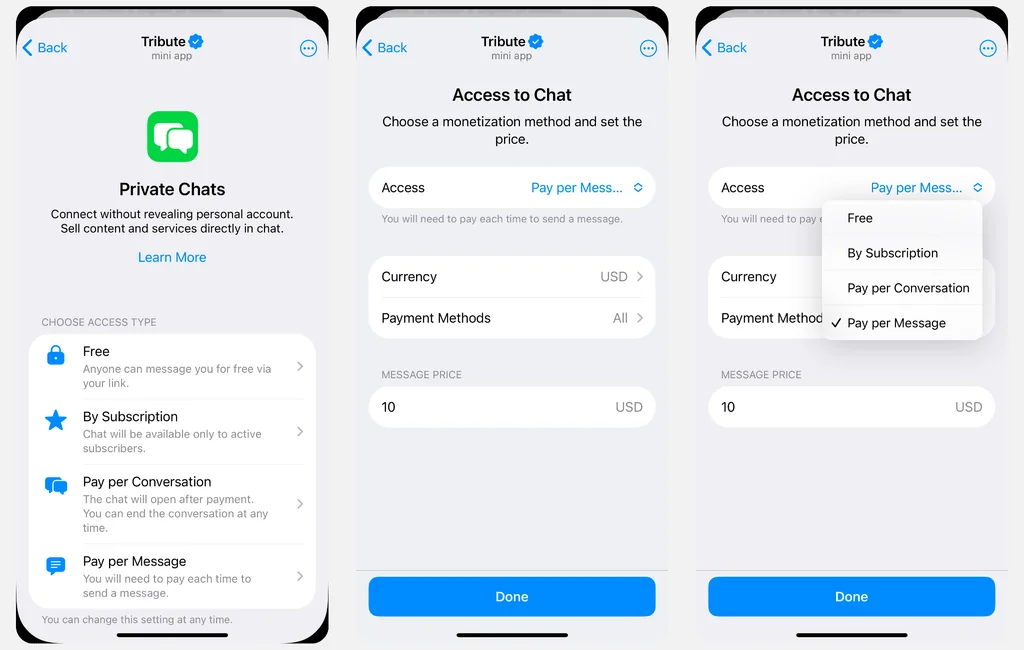
Private Chats turn one-to-one advice into a revenue line without a booking calendar. The most useful setup for coaching is “free message, paid reply”: a player sends a clip for free, and your breakdown opens once they pay.
You can raise the price of later messages mid-conversation when a quick question turns into a full review. You can also limit paid chats to your VIP subscribers.
Should you move your gaming community from Discord to Telegram?
Usually not all of it. Keep Discord for voice, and move announcements and the paid tier to Telegram, where they reach more people and pay out outside the US.
There are three ways to set this up:
- Add a Telegram channel: Keep everything on Discord and use a Telegram channel for patch notes and drops. Lowest effort, and it grows a second audience.
- Run a hybrid: Free hangout and voice on Discord, paid VIP channel and broadcasts on Telegram. This fits most gaming creators.
- Move fully: Makes sense for mobile-first or broadcast-heavy communities, and for creators outside the US who can’t use Discord’s paid memberships.
If your problem is voice quality or ID checks, there are better Discord alternatives than Telegram for that job. Telegram is one of the good alternatives to Discord for reach and revenue, not for competitive voice.
How to move members without losing them
Run both platforms in parallel for two to four weeks. Pin the Telegram link in your Discord announcements channel and mention it on stream.
Give the first wave a reason to switch. A free trial or a first-period discount on the VIP tier lowers the barrier, and gift subscriptions let you seed your core roster.
Turn on automatic posting so your subscription offer reposts to your channels weekly. Late movers still see it, and the post updates itself when you change the price or description.
Best Discord alternatives for gaming in 2026 (beyond Telegram)
For low-latency voice, TeamSpeak and Mumble are the best Discord alternatives for gamers. For a Discord-style open-source server, try Stoat. For encrypted chat, use Signal or Element.
These are the top Discord alternatives that actually suit gaming groups.
| App | Best for | Price | Voice | Screen share | Built-in monetization |
| TeamSpeak | Competitive squads | Free self-hosted up to 32 users; paid hosting beyond | Low latency | Yes | No |
| Mumble | Open-source, self-hosted voice | Free | Low latency, positional audio | No | No |
| Steam Chat | PC friend groups | Free with Steam | Encrypted voice calls | Limited | No |
| Stoat (formerly Revolt) | Discord-style servers, open source | Free, donation-funded | Yes | Early stage | No |
| Element (Matrix) | Encrypted, federated communities | Free self-hosted; paid plans | Yes | Yes | No |
| Signal | Private group chat | Free | Encrypted by default | Yes (desktop) | No |
| Telegram | Broadcast and paid communities | Free | Scheduled voice chats | Yes | Stars and payment bots |
Most free Discord alternatives also trade polish for control. Stoat is the closest match to Discord’s layout, but its screen sharing and stability aren’t at Discord’s level yet. Element brings strong encryption and a steeper setup curve.
The best alternatives to Discord for a creator usually come in pairs: a voice app your squad likes, plus a channel where your audience follows you and pays you. Good Discord alternatives cover one of those jobs well, and none of the voice-first ones covers both.
Where to build your gaming community
Use Discord for voice, and Telegram for reach and revenue. The Telegram vs Discord question rarely has a one-app answer for creators. It has the right app for each job.
If your paid layer is the part that isn’t working yet, Tribute lets you run a VIP channel with tiers, trials, and payouts from any country without leaving Telegram.
FAQ
Is Telegram better than Discord for gaming communities?
It depends on how your community works. Discord is stronger for live voice, squad chat, and real-time interaction. Telegram is better for announcements, content distribution, large audiences, and monetization.
Can Telegram replace Discord for a gaming community?
Yes, if your community is built more around content, updates, discussion, and paid access than constant voice chat. For communities that mainly use Discord to talk during matches, Discord may still be the better fit.
Which is better for monetization, Discord or Telegram?
Telegram gives creators more flexibility through payment bots like Tribute. With Tribute, you can sell subscriptions, accept donations, sell digital and physical products, and offer paid chats inside Telegram.
Can I monetize a Telegram gaming community if I don’t live in the US?
Yes. Tribute works with verified creators outside the US and supports buyers from different countries. This makes it more practical for international gaming communities than Discord’s native paid memberships.
What payment methods can gaming fans use with Tribute?
Tribute supports cards, Apple Pay, Google Pay, and crypto payments including TON, BTC, and USDT. Telegram Stars are also available for digital products.
Can I stream games on Telegram?
Yes. Telegram supports live streams in channels and video chats in groups, so it works for broadcasts, watch parties, community events, and creator streams. Discord is still stronger for voice-first gaming sessions.
What can a gaming creator sell through Tribute?
You can sell paid community access, subscriptions, digital content, physical merch, and paid chats, as well as accept donations. For example, a gaming creator could sell access to a private channel, downloadable guides, coaching, or merch.
Can I sell game accounts, in-game currency, or game keys through Tribute?
Tribute does not allow the sale of accounts or in-game currencies. Pirated or unlicensed goods are also prohibited. Game-related digital products should only be sold if you have the right to distribute them.